Stereo calibration
In this tutorial, we explain how to run the stereo calibration procedure with the stereoCalib module. The current implementation supports both the standard pinhole camera model and the fisheye camera model. Before starting the procedure print a chessboard calibration pattern. For convenience, you can find it in $ICUB_ROOT/app/cameraCalibration/data.
Make sure you have a config file, e.g. icubEyes.ini, with the following parameters:
[STEREO_CALIBRATION_CONFIGURATION]
boardWidth W
boardHeight H
boardSize S
numberOfPairs N
cameraModel pinhole|fisheye
calibrationMode StereoFull
syncToleranceMs 20
syncQueueSize 5
minCaptureIntervalSeconds 2
minimumBoardSpanRatio 0.15
- The
boardWidthW is the number of corners along the width direction of the chessboard pattern (e.g. 8 for the provided pattern). - The
boardHeightH is the number of corners along the height direction of the chessboard pattern (e.g. 6 for the provided pattern). - The
boardSizeS specifies the length (in meters) of one side of the squares in the chessboard pattern. - The
numberOfPairsN specifies the number of synchronized stereo pairs used for the calibration procedure. At least 30 valid pairs are required. - The
cameraModelselectspinholeorfisheyecalibration. Use the model that matches the camera optics. - The
calibrationModeselectsStereoFull,MonocularLeft,MonocularRight, orMonocularBoth. For the normal procedure useStereoFull. - The synchronization and capture parameters limit the timestamp difference, queue size, time between accepted candidates, and minimum chessboard size. Their defaults are suitable for most setups.
The group [STEREO_CALIBRATION_CONFIGURATION] is the only one used by the module, all the other groups in the config file will be ignored. To understand which is the default file used by stereoCalib module, you can run yarp resource --context cameraCalibration --from icubEyes.ini.
To run the calibration module and all the connections, you can use the stereoCalib.xml.template file provided in: $ICUB_ROOT/app/cameraCalibration/scripts. Additional details on the created ports can be found in the stereoCalib module page. Notice that some ports are for special purposes and are not useful to regular users.
In order to start a calibration procedure, open a new terminal and connect to the RPC port:
yarp rpc /stereoCalib/cmd
The calibration procedure can be started writing the command:
start
Use status to inspect the state and calibration quality, stop to stop collection, and help to list the commands.
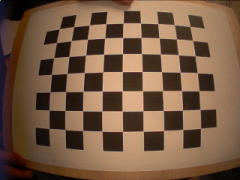
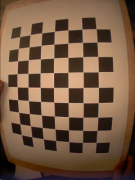
Show now the chessboard pattern in landscape mode (see examples below). Try to cover the most part of the images and show it in different image positions in order to obtain a complete distortion map. As feedback, you should see the detected corners in the two yarpview(s). The procedure continues to acquire images automatically after a short delay between one image and the next one.
| Example of correct calibration image | Example of incorrect calibration image |
|---|---|
 |
 |
The values printed above are related to the average reprojection error of the 3D points to the image plane. To get good parameters you should see errors below 1 pixel.
The parameters are saved automatically in the output file located in the context of the module (default: $ICUB_ROOT/app/cameraCalibration/conf/outputCalib.ini). The file is replaced atomically after a successful calibration. Copy or rename it to the file used by the robot, for example icubEyes.ini, after checking the result.
An example of output calibration file is:
[CAMERA_CALIBRATION_RIGHT]
projection pinhole
w 320
h 240
fx 215.483
fy 214.935
cx 174.868
cy 105.63
k1 -0.343166
k2 0.0987467
p1 -0.00180031
p2 -0.000303536

[CAMERA_CALIBRATION_LEFT]
projection pinhole
w 320
h 240
fx 215.622
fy 215.056
cx 163.367
cy 111.212
k1 -0.367522
k2 0.132343
p1 -0.000399841
p2 -0.00016906

[STEREO_DISPARITY]
HN (0.996239 -0.016423 -0.0850726 -0.0667909 0.0189257 0.999409 0.0286955 -0.00388152 0.084551 -0.0301976 0.995961 -0.0128745 0 0 0 1)
QL ( 0.000000    0.000000    0.000000   -0.020714   -0.001918    0.000767   -0.000575   -0.000048)
QR ( 0.000000    0.000000    0.000000   -0.020714   -0.001918    0.000767   -0.000575   -0.000021)
For fisheye calibration, set cameraModel fisheye. The two camera groups then contain projection fisheye and use k1, k2, k3, and k4:
[CAMERA_CALIBRATION_LEFT]
projection fisheye
w 640
h 480
fx ...
fy ...
cx ...
cy ...
k1 ...
k2 ...
k3 ...
k4 ...
The parameters w and h are the image resolution used during the calibration.
The parameters fx and fy are the focal lengths (along the x and y axes respectively) expressed in pixel units.
The point (cx, cy) is the principal points, and usually is the image center.
For pinhole cameras, k1, k2, p1, and p2 are the distortion coefficients. For fisheye cameras, k1, k2, k3, and k4 are the fisheye distortion coefficients.
In the [STEREO_DISPARITY] group the extrinsic parameters are saved. HN is the homogeneous transform from the left camera to the right camera. R and T contain the same rotation and translation separately. Older files may also contain QL and QR; these are legacy robot-pose values and are not required by the new calibration writer. The fisheye rectifier requires HN with a non-zero translation and both camera calibration groups.
To apply the generated calibration, run one camCalib instance per camera:
camCalib --context cameraCalibration --from icubEyes.ini \
    --group CAMERA_CALIBRATION_LEFT --name /icub/camcalib/left
camCalib --context cameraCalibration --from icubEyes.ini \
    --group CAMERA_CALIBRATION_RIGHT --name /icub/camcalib/right
Connect each raw camera stream to the corresponding /in port and use the /out port as the corrected and rectified stream. camCalib selects the rectifier from the projection key.
Additional information regarding the calibration parameters can be found in the OpenCV Documentation.