iCub 2.10 network architecture
iCub 2.10 includes a backpack COM Express computer and a Jetson Orin NX in the head. This page will describe how those computers, the motor-control boards and external setup machines communicate. For the earlier general configuration, see iCub networking.
Computer roles
| Node | Hardware | Role | Hostname |
|---|---|---|---|
| Backpack computer | Intel i7 COM Express Type 10 | Robot control and motor-network connection | icub-torso |
| Head computer | NVIDIA Jetson Orin NX | FRAMOS acquisition and GPU processing | icub-head |
iCub network interfaces
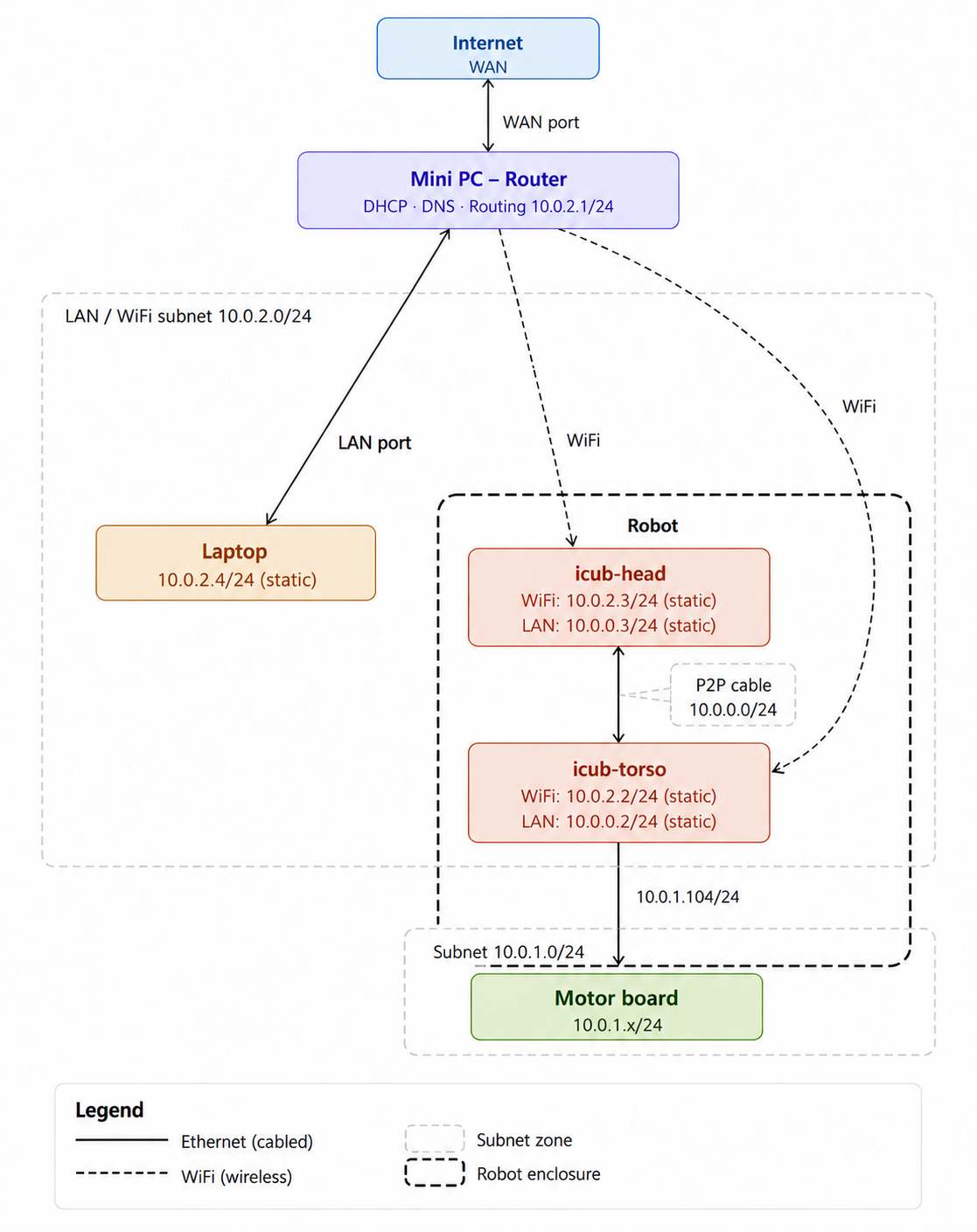
The network on iCub can be divided in three parts:
- internal network (10.0.1.0/24): it connects
icub-torsoto all the motor controller boards on the robot, it is a segregated network (there is no connection from the nodes on its subnet and the ouside world) and it is used to send motor commands from icub-torso to motor control boards; - extenal network (10.0.2.0/24): it connects all the iCub machines together, handling the internet connection too;
- backup network (10.0.0.0/24): this is a backup/troubleshoot network for connecting directly to the robot in case of not reaching the external network.
icub-torso
On icub-torso, one of the two ethernet interfaces is connected to the internal network. The other one, instead, is directly connected to icub-head via backup network.
icub-head
On icub-head, the ethernet interfaces are bridged together on the backup network.
Both head and torso are connected to the external network via WiFi.
icub-laptop
Usually, there is a icub-laptop in the iCub network and it's used to connect to both icub-head and icub-torso via ssh connection. It can be wired connected to the external network or via WiFi.
IP addresses and other network configurations
Below you can find the default network parameters of the iCub networks.
Internal network configurations
This configuration depends deeply on the motor control board firmware and thus it can't be changed.
- IP address : 10.0.1.104 - STATIC
- Netmask : 255.255.255.0
Since this is a segregated network, there is no default gateway.
External network configurations
Usually, it is a static configuration, but it works also in DHCP mode. This configuration can be changed but it is not recommended.
For icub-torso:
- WiFi IP address : 10.0.2.2
- Netmask : 255.255.255.0
- Default Gateway : 10.0.2.1
- DNS server : 10.0.2.1
For icub-head:
- WiFi IP address : 10.0.2.3
- Netmask : 255.255.255.0
- Default Gateway : 10.0.2.1
- DNS server : 10.0.2.1
For icub-laptop:
- WiFi IP address : 10.0.2.4
- Netmask : 255.255.255.0
- Default Gateway : 10.0.2.1
- DNS server : 10.0.2.1
Backup network configurations
For icub-torso:
- IP address : 10.0.0.2
- Netmask : 255.255.255.0
For icub-head:
- IP address : 10.0.0.3
- Netmask : 255.255.255.0
For icub-laptop:
- IP address : 10.0.0.4
- Netmask : 255.255.255.0